



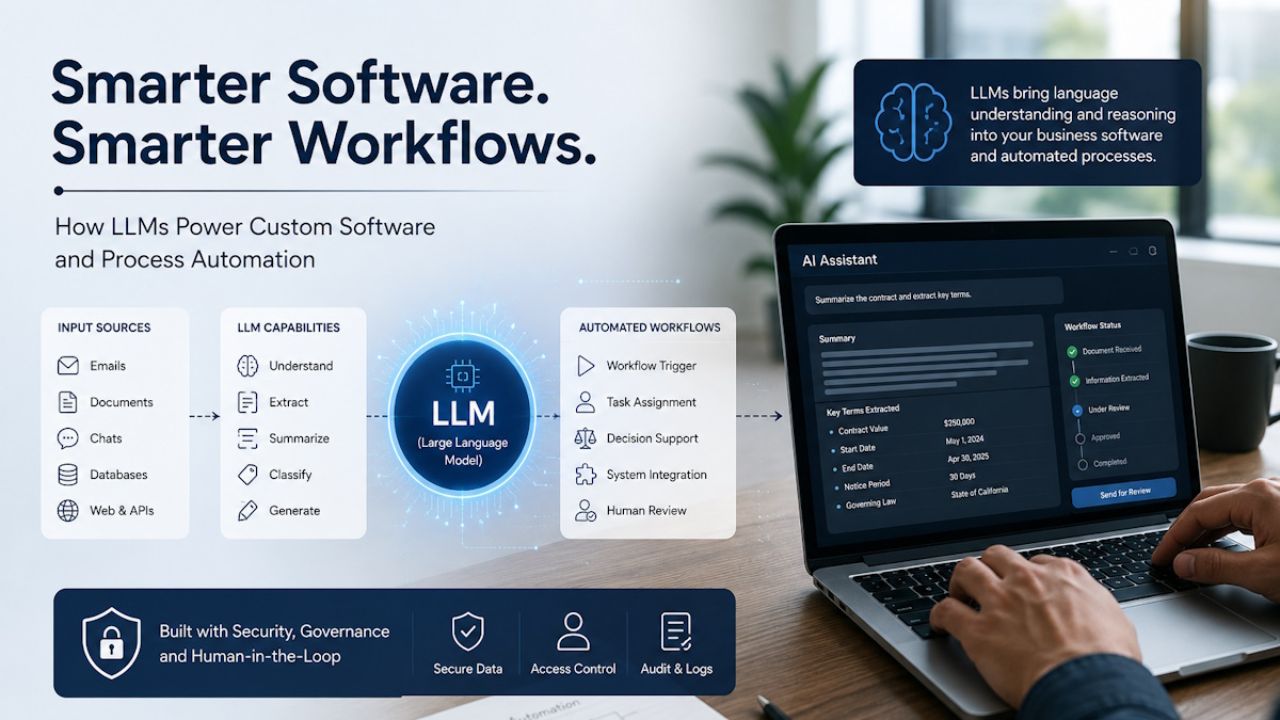
Large language models have moved from tech demos into business software. A few years ago, most teams used AI mainly for chatbots, search, or basic text generation. Now, LLMs are starting to sit inside custom applications, internal tools, support systems, reporting dashboards, and process automation workflows.
This shift matters because many business processes are still built around human reading, writing, checking, routing, and decision support. Emails need to be classified. Documents need to be reviewed. Tickets need to be understood. Reports need to be summarized. Customer queries need context before they reach the right person.
Traditional software handles structured data very well. It can process numbers, forms, rules, and database records with speed and accuracy. The challenge begins when the input is messy, written in natural language, or spread across files, chats, emails, PDFs, and notes. That is where LLMs are becoming useful.
LLMs do not replace custom software. They make custom software more capable when language, context, and reasoning-like support are involved.

What LLMs Bring to Custom Software
Custom software is usually built around specific workflows. A logistics company may need a dispatch system. A healthcare provider may need a patient intake portal. A finance team may need a document review tool. A manufacturer may need a vendor management platform.
In all these cases, the software is designed around business rules. LLMs add a language layer on top of those rules. They can read, classify, summarize, draft, extract, compare, and explain information in ways that standard rule-based software cannot easily handle.
For example, a support platform can use an LLM to understand the intent behind a customer message, check past tickets, suggest a response, and route the issue to the right team. A legal operations tool can use an LLM to scan a contract and highlight clauses that need review. An HR system can summarize employee feedback and group common concerns.
This does not mean the model should make final decisions alone. In most business settings, LLMs work best as assistants inside a larger software system. The application still manages permissions, records, workflows, approvals, audit logs, and business rules.
DML Training has explained the broader foundation of AI software development, and LLMs are now one of the most practical parts of that larger AI software movement.
Why Process Automation Needed a Language Layer
Process automation has existed for years. Businesses have used scripts, workflow tools, robotic process automation, and rule engines to reduce manual tasks. These tools work well when the process is predictable.
For example:
- If an invoice is approved, send it to payment.
- If a lead fills out a form, assign it to sales.
- If stock drops below a set number, trigger a purchase request.
The problem is that many real processes are not that clean. A customer complaint may include mixed emotions, missing details, and several issues in one message. A vendor invoice may have unusual wording. A project update may include risks that are not written in a fixed format.
LLMs help automation systems understand this kind of unstructured input. They can turn natural language into usable business data. Once that happens, the rest of the workflow can continue through standard software logic.
This is one reason companies are exploring LLMs in areas such as customer service, claims processing, employee support, compliance review, sales operations, and internal knowledge management.
Practical Use Cases of LLMs in Custom Software
One strong use case is document processing. Many businesses still spend hours reading contracts, invoices, applications, reports, resumes, claims, or policy documents. LLMs can extract key details, summarize content, compare versions, and flag missing information.
Another use case is customer support. Instead of using a basic chatbot with fixed replies, a custom support system can use an LLM to understand the customer’s issue, check knowledge base content, suggest replies, and help agents respond faster.
LLMs are also useful in internal knowledge systems. Employees often waste time searching across documents, chat threads, and old tickets. A custom knowledge assistant can answer questions using approved company data and provide source references.
In sales and marketing operations, LLMs can help summarize call notes, draft follow-up emails, classify leads, and prepare account briefs. In software teams, they can support code explanation, test case drafting, technical documentation, and issue analysis.
In finance and insurance, LLMs can help review claims, summarize risk notes, and support underwriting workflows. DML Training has also covered how AI and big data in insurance software are changing areas such as claims, fraud checks, and predictive analysis.
The common pattern is simple. Wherever people spend time reading, writing, checking, or routing text-heavy information, LLMs may reduce manual work.
LLMs Are Not Standalone Automation Systems
A common mistake is treating an LLM as the full automation system. It is not.
An LLM can understand and generate language, but a business process needs much more than that. It needs user roles, access control, data validation, workflow states, approval paths, reporting, security checks, and system connections.
For example, an LLM may identify that a refund request looks valid. The software still needs to check the customer profile, order history, return policy, payment status, and approval limits. Only then should the system move the request forward.
This is why LLMs are most useful when built into custom software architecture. The model handles language-heavy tasks. The software handles rules, data, actions, and governance.
A well-planned system may include:
- A user interface for employees or customers
- A secure database
- APIs connected to existing tools
- An LLM layer for text understanding
- Human approval steps
- Logs for review
- Monitoring for errors and unusual outputs
This balance keeps automation useful without giving too much control to the model.
The Rise of AI Agents in Workflow Automation
LLMs are also powering AI agents. An AI agent can take a goal, break it into steps, use tools, and complete a workflow with some level of independence.
For example, an agent in a customer service system may read a complaint, check order data, search policies, draft a response, create a ticket update, and ask a human agent for approval. In a finance workflow, an agent may collect invoice data, compare it with purchase orders, detect missing fields, and prepare an approval note.
This is different from a simple chatbot. A chatbot answers questions. An AI agent can work across tasks.
DML Training has discussed this direction in its article on agentic AI and the future of work. For business software, this trend points toward systems that do not just respond to users but help move work forward.
Still, agentic workflows need clear limits. Every agent should have defined permissions, approved tools, data boundaries, and review steps. Without those controls, automation can create risk instead of saving time.
Where Custom Software Makes LLMs More Useful
Many businesses start by testing public AI tools. That is fine for learning, but serious business use often needs a custom setup.
Custom software allows teams to connect LLMs with their own data, workflows, and rules. It also allows better control over security, user access, output review, and system behavior.
For example, a generic AI tool may summarize a document. A custom LLM-powered application can do much more. It can identify the document type, extract fields, compare the content with company policy, assign a confidence score, ask for missing details, create a task, and store the result in the right system.
This is where planning matters. Businesses need to decide which tasks should be automated, which ones need human review, and which ones should remain manual.
Working with experienced AI consulting services can help businesses assess use cases, data readiness, risk, and the right technical approach before they build LLM-powered software.
Common Challenges Businesses Should Expect
LLMs are powerful, but they are not perfect. They can misunderstand context, produce incorrect answers, or sound confident when they are wrong. This is one of the biggest reasons human review is still needed in many workflows.
Data quality is another challenge. If internal documents are outdated, duplicated, or poorly organized, the LLM may return weak answers. A good AI system depends on clean, relevant, and well-structured knowledge sources.
Security is also a major concern. Business software may handle customer records, contracts, financial data, health information, or private company documents. Teams need to decide what data can be shared with an AI model, where it is processed, and how it is stored.
Cost can also surprise teams. LLM usage may depend on the number of requests, token volume, model choice, hosting method, and monitoring needs. A small pilot may be inexpensive, but large-scale use across many departments needs cost planning.
There is also a people challenge. Employees may not trust AI outputs at first. Others may rely on them too much. Training, clear policies, and gradual rollout help teams use LLMs responsibly.
Building Safer LLM-Powered Workflows
A safer LLM workflow starts with a narrow use case. Instead of trying to automate an entire department, businesses should begin with one repeatable process that has clear inputs and outputs.
Good first use cases often include:
- Summarizing support tickets
- Extracting fields from standard documents
- Drafting internal reports
- Classifying customer requests
- Searching approved knowledge bases
- Preparing first-draft responses for review
The next step is to define success. Does the system reduce handling time? Improve accuracy? Lower backlog? Help employees respond faster? Without clear goals, it becomes hard to judge whether the LLM is actually helping.
Human review should be built into the workflow, at least during the early stages. Teams can later decide which steps are safe to automate fully and which need approval.
Businesses should also keep logs of inputs, outputs, actions, and user feedback. These logs help improve prompts, update knowledge sources, detect errors, and prove that the system is working as expected.
The Best LLM Use Cases Are Usually Boring
The most useful LLM projects are not always flashy. They often solve boring, repetitive, expensive problems.
A team may spend hundreds of hours each month reviewing documents. A support department may answer the same questions again and again. A sales team may lose time preparing account summaries. A compliance team may manually scan policy documents. These tasks may not look exciting, but they create real cost.
LLMs can help by reducing the manual reading and writing load. Employees still make decisions, but they start with better prepared information.
This is where businesses should focus first. The best use case is not the one that sounds most advanced. It is the one where language-heavy work slows people down every day.
What the Future Looks Like
LLMs will become a normal layer inside business software. Users may not even think of them as AI. They will simply expect software to understand questions, summarize records, explain reports, prepare drafts, and guide workflows.
Custom software will become more conversational. Employees will ask systems for insights instead of clicking through many screens. Customers will get more useful support without waiting for every answer to be typed by a human. Managers will receive clearer summaries from complex data and documents.
At the same time, businesses will need stronger governance. The more LLMs influence workflows, the more important it becomes to manage data access, output quality, approvals, and accountability.
The future is not about replacing every process with AI. It is about adding language intelligence to the places where traditional software has always struggled.
Final Thoughts
LLMs are changing how businesses think about custom software and process automation. They make it possible for software to work with language, context, and messy information in a more natural way.
The real value comes when LLMs are used inside well-designed systems. They should support employees, improve workflows, and reduce repetitive work without removing human judgment where it matters.
Businesses that start with clear use cases, clean data, human review, and practical goals will get better results than those chasing AI for its own sake.
LLMs are not magic. They are a new software layer. Used carefully, they can help teams build smarter tools, faster workflows, and better business systems.
Author Bio: Arjun is a business growth strategist at a software development company. Apart from building long-term relationships with customers and boosting business revenue, I am also interested in sharing my knowledge of various technologies through successful blog posts and articles.